Platform
Control design
How engineers design control logic and device configuration in the web UI, and how those designs become deployable artifacts.
Design intent
Use this lens when implementing Control design across a fleet: define clear boundaries, make change snapshot-based, and keep operational signals observable.
- Model behavior as IEC 61499 applications with explicit interfaces
- Keep site-specific details in config so designs stay reusable
- Freeze a snapshot before commissioning so tests map to a stable artifact
What it is
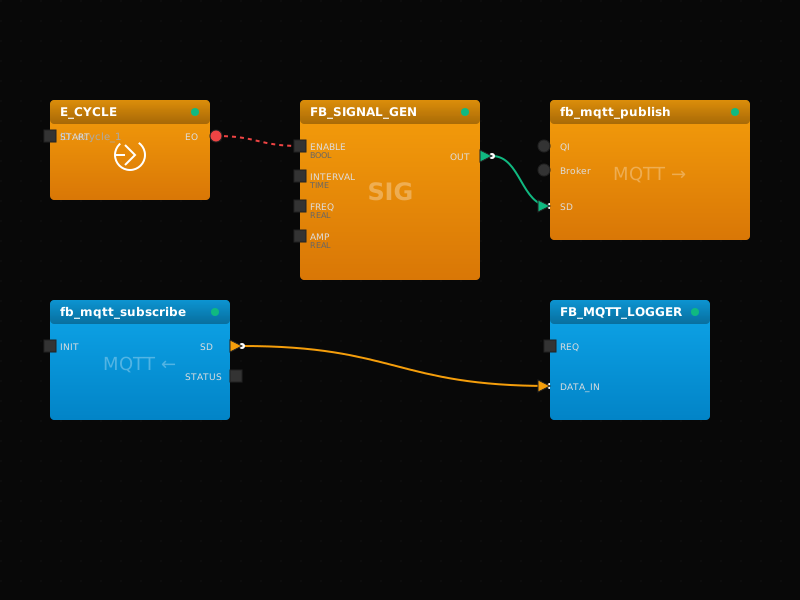
BootCtrl provides a single web interface to model IEC 61499 applications (function block networks) and the devices/resources they run on.
Design constraints
- Model behavior as IEC 61499 applications with explicit interfaces
- Keep site-specific details in config so designs stay reusable
- Freeze a snapshot before commissioning so tests map to a stable artifact
Architecture at a glance
- UI captures engineering intent; backend persists models and versions; edge runs artifacts
- The UI must reflect operational truth: deployed snapshot, drift, and health
- Good UX encodes constraints so unsafe states are hard to create
- This is a UI + backend + edge concern: design decisions affect safety and speed
Typical workflow
- Define scope and success criteria (what should change, what must stay stable)
- Create or update a snapshot, then validate against a canary environment/site
- Deploy progressively with health/telemetry gates and explicit rollback criteria
- Confirm acceptance tests and operational dashboards before expanding
System boundary
Treat Control design as a repeatable interface between engineering intent (design) and runtime reality (deployments + signals). Keep site-specific details configurable so the same design scales across sites.
Example artifact
Implementation notes (conceptual)
topic: Control design
plan: define -> snapshot -> canary -> expand
signals: health + telemetry + events tied to version
rollback: select known-good snapshot
Why it matters
- One source of truth for control logic + configuration
- Repeatable, auditable changes (no “mystery PLC project” drift)
- Clear handoffs between engineering, commissioning, and operations
Engineering outcomes
- Model behavior as IEC 61499 applications with explicit interfaces
- Keep site-specific details in config so designs stay reusable
- Freeze a snapshot before commissioning so tests map to a stable artifact
Quick acceptance checks
- Model devices/resources first so the canvas matches the target topology
- Compose FB networks and connections with consistent naming for traceability
Common failure modes
- Drift between desired and actual running configuration
- Changes without clear rollback criteria
- Insufficient monitoring for acceptance after rollout
Acceptance tests
- Verify the deployed snapshot/version matches intent (no drift)
- Run a canary validation: behavior, health, and telemetry align with expectations
- Verify rollback works and restores known-good behavior
In the platform
- Model devices and resources (FORTE execution containers)
- Compose function block networks and connections
- Validate models before deployment planning
Implementation checklist
- Model devices/resources first so the canvas matches the target topology
- Compose FB networks and connections with consistent naming for traceability
- Validate interface contracts (events/data) before planning deployments
- Freeze a snapshot before commissioning so tests map to a stable artifact
Rollout guidance
- Start with a canary site that matches real conditions
- Use health + telemetry gates; stop expansion on regressions
- Keep rollback to a known-good snapshot fast and rehearsed
Acceptance tests
- Verify the deployed snapshot/version matches intent (no drift)
- Run a canary validation: behavior, health, and telemetry align with expectations
- Verify rollback works and restores known-good behavior
Deep dive
Practical next steps
How teams typically apply this in real deployments.
Key takeaways
- Model behavior as IEC 61499 applications with explicit interfaces
- Keep site-specific details in config so designs stay reusable
- Freeze a snapshot before commissioning so tests map to a stable artifact
Checklist
- Model devices/resources first so the canvas matches the target topology
- Compose FB networks and connections with consistent naming for traceability
- Validate interface contracts (events/data) before planning deployments
- Freeze a snapshot before commissioning so tests map to a stable artifact
Next steps
Related topics
Deep dive
Common questions
Quick answers that help during commissioning and operations.
What belongs in “control design” vs device configuration?
Put behavior in IEC 61499 apps (function blocks + connections). Put site specifics (endpoints, point mappings, resource selection) in configuration so the same app can be deployed broadly.
How do we prevent “canvas drift” from the running system?
Always deploy from snapshots and treat the snapshot ID as the ground truth. If the running state differs, flag drift and reconcile via re-deploy or rollback.
What should we validate before the first site rollout?
Check interface wiring, data types, I/O point mappings, and any adapters that touch protocols. Then canary a single site and verify behavior using telemetry and event timelines.